Catechism Handwriting
Editable Tracing of Baltimore Catechism 1

About September last year I had the bright idea to make the whole Baltimore Catechism 1 into a big tracing book in different styles of handwriting.
Cursive
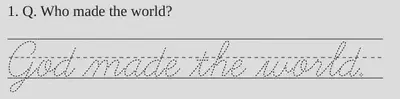
Here’s Learning Curve by Blue Vinyl Fonts:
cursive-baltimore-1.pdf 32 pt, 67 pages, odt editable OpenOffice file
cursive-alt-g-baltimore-1.pdf 44 pt, 99 pages, using the alternative and more readable way of forming an uppercase G and Q, odt editable OpenOffice file
Bat and Ball
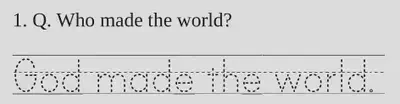
Here’s Print Clearly also by Blue Vinyl Fonts:
- bat-ball-baltimore-1.pdf 32 pt, 70 pages. odt editable OpenOffice file
- bat-ball-baltimore-2.pdf 48 pt, 116 pages. odt editable OpenOffice file
European Cursive
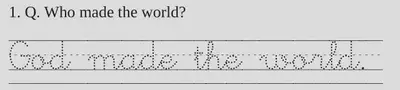
Here’s a font called Abecedario from gnuLinEx:
- european-baltimore-1.pdf 32 pt, 80 pages. odt editable OpenOffice file
If memory serves, I edited the Abecedario font to fix the way it handled spaces. As I understand it, I can distribute the edited font as long as I also point to the Gnu Public Licence.
- Abcedariopunt-pautada.ttf (I changed the name a little as I keep spelling it this way and hopefully now I’ll be able to find it!) - The font is called abecedario and it’s part of the fonts-linex package in most Debian repositories.
Briem Italic

Gunnlauger SE Briem put together books and an amazing website on teaching handwriting to children. This is an Italic with short ascenders.
- briem-baltimore.pdf 36pt, 91 pages odt
- briem-baltimore-2.pdf 24pt, 55 pages odt
Foundation Italic
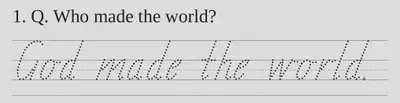
In Australia each state teaches a variation of italic handwriting. Here I’ve picked a Tasmanian font by Mez Merrit.
- foundation-baltimore-1.pdf 32 pt, 72 pages. odt editable OpenOffice file
- foundation-baltimore-2.pdf 48 pt, 121 pages. odt editable OpenOffice file
- foundation-vic-baltimore-1.pdf 32 pt, 75 pages. odt
- foundation-sa-baltimore-1.pdf 32 pt, 78 pages. odt
- foundation-qld-baltimore-1.pdf 32 pt, 78 pages. odt
- foundation-nsw-baltimore-1.pdf 32 pt, 71 pages. odt
- schoolfonts-baltimore-2.odt experimental School Fonts version - this is trickier as their lines are separate characters that are designed to go in an overlay.
You can use any font you like. In OpenOffice, either press F11, or find the Manage Styles item in the Styles menu. I’ve used the Preformatted Text style for the traceable handwriting.
Right click on “Preformatted Text” and select Modify. That should let you change the font, size or whatever and then click “Apply” and your changes should magically appear in the document!
I’m sure you could also change the paper size too, in case you live in a funny non-A4 country.
God bless you!

Veronica Brandt
Main Troublemaker
My research interests include pedagogical approaches to forming choirs, knitting socks and getting Linux to work.